
Everyday
DynamifyFood & Drink
4.7302.00 Reviews
- Version
- 2.35.24
- Installs
- 100.00K
- Age Rating
- Everyone
Screenshots

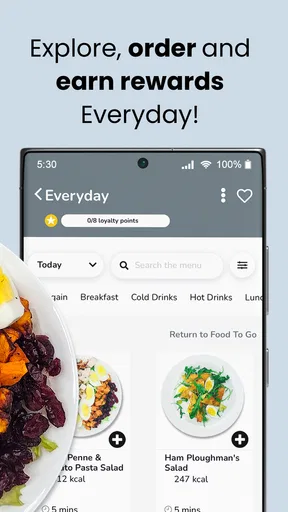
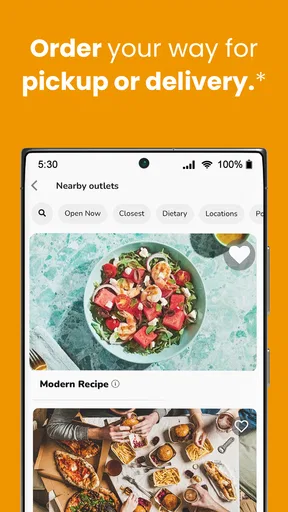
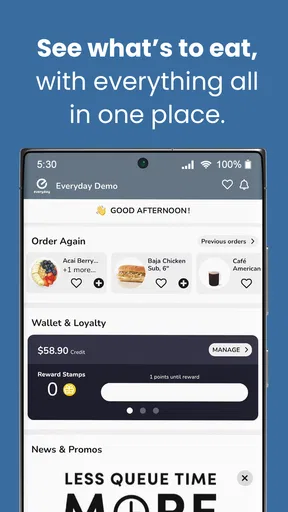
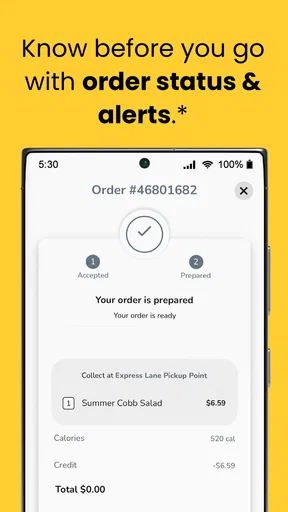
Our Review of Everyday
 Analysis by Appyee
Everyday is the kind of food and drink app I would open when I am already standing near a café, restaurant, workplace canteen, or event counter and do not want to waste time in a queue. Its central idea is simple: use the app where participating food outlets support it, place an order or access the available service, and build rewards while doing something I was going to do anyway. That makes it more practical than a general restaurant-discovery tool, but also more dependent on where and how it is used.
Developed by Dynamify, this free app is aimed at ordinary repeat purchases rather than elaborate meal planning. The audience is broad because its content rating is Everyone, and the Android requirement is modest at 8.0 or later. I see it as most useful for people who regularly buy lunch at the same workplace, visit a venue more than once, or want a quicker alternative to waiting at a counter. It is less compelling if I only need a one-off restaurant search or if the places I visit do not use the service.
How Everyday feels in current use
The first thing I noticed about Everyday is that its value comes from reducing small moments of friction. The store summary focuses on skipping lines and earning rewards, and that description matches the practical appeal: I can treat the app as a shortcut for a familiar food purchase instead of another place to browse endlessly. The experience makes the most sense when I already know what I want, where I am going, and whether that location supports the app.
That distinction matters. This is not the same as a broad delivery marketplace where I compare dozens of menus and wait for a courier. It is closer to a digital layer placed over an existing food-service routine. The app can be useful before arriving at a busy counter, during a short break, or when an event crowd suddenly makes a normally quick purchase inconvenient. I would not install it expecting every nearby takeaway to appear or every order to work in exactly the same way.
In my experience, the best approach is to check the app before I am in a hurry. I would look for the relevant venue, confirm that the service is available there, and then decide whether using it is faster than ordering directly. That small habit avoids the most frustrating situation: reaching the front of a queue only to discover that the app is intended for a different outlet, service area, or ordering flow.
The reward element also changes how I judge the app. A single use may save time, but the stronger reason to keep it installed is repeated use. If I buy lunch from the same place several times a week, earning rewards can make the digital routine feel worthwhile. If my eating habits change constantly, the benefit becomes less predictable and I may prefer a straightforward payment or delivery app that works across more businesses.
A realistic weekday scenario
Imagine I have a short lunch break and the café downstairs is already busy. Instead of joining the line immediately, I open Everyday and check whether that café is available. If it is, I use the supported ordering route, review the item and collection details carefully, then continue with another task while the order is being prepared. The real advantage is not that the app makes lunch magically faster; it is that it can move part of the waiting process away from the counter.
There is a useful trade-off here. Ordering ahead can help when the queue is the bottleneck, but it does not remove preparation time, collection traffic, or the possibility that the outlet is unusually busy. I would therefore use it for predictable purchases and leave extra time when I need food by a strict deadline. The app is a convenience tool, not a guarantee that every order will be ready the moment I arrive.
Rewards can make that same routine more attractive, especially when I remember to use the app consistently. The less obvious tip is to think of it as a habit tracker for participating food stops: choose the locations I visit repeatedly, keep the app ready before the rush, and avoid switching between direct ordering and app ordering without a reason. Inconsistent use can make the rewards side feel less useful because my purchases are scattered across different channels.
What the current release tells me
The current version is 2.35.24, which suggests a product that has continued to receive updates rather than remaining a one-time experiment. The app was released on April 17, 2018, so its present form sits on top of a product with several years of development behind it. I would interpret that as a positive sign for maturity, while still separating that observation from any promise about future features or service availability.
For existing users, a current version can matter more than a dramatic redesign. Small improvements in ordering reliability, account handling, venue information, or reward tracking can have a bigger effect on a food app than visual changes. I would keep the app updated, particularly if it is used for regular purchases, because an older installation may not behave like the current service at participating locations.
At the same time, a version number alone does not tell me that every part of the experience has changed. I would not assume that a newer release automatically adds more venues, changes reward rules, or fixes every local issue. Those details can depend on the participating business and the way its service is configured. My advice is to judge the app by the location I actually use, not only by the age of the application.
The public response is encouraging: Everyday has a 4.7 average from around 5.2 thousand ratings, alongside more than 300 written reviews. It has also passed 100 thousand installs. Those figures indicate that the app has found a real audience, but they should be read as a broad signal rather than a guarantee for my particular café or workplace. A high overall rating cannot remove the practical difference between a smooth, well-supported venue and one where the digital process is less convenient.
Who benefits most from it
I would recommend Everyday first to regular customers of participating food outlets. Office workers who buy lunch in the same building, students who return to the same campus café, and visitors to recurring venues are the clearest examples. In these situations, the app can combine two useful behaviors—avoiding a line and collecting rewards—without asking me to change where I eat.
It can also suit someone who dislikes handling a crowded counter during a short break. The app gives me a chance to make the order earlier and approach collection with a clearer plan. That is especially helpful when I already know my usual order and do not need to spend time comparing every option. The more predictable my routine, the more likely the app’s convenience will outweigh the effort of maintaining another food account on my phone.
I would be more cautious about recommending it to a person who wants broad restaurant coverage, delivery from independent businesses, detailed dietary research, or a single wallet for every food purchase. Everyday’s strength is focused convenience around supported services. A general delivery app, a restaurant’s own application, or simply paying at the counter may be better when discovery, delivery range, or menu depth matters more than queue avoidance.
Small workflows that make a difference
One useful workflow is to prepare before the busiest part of the day. I would open the app when I have a quiet moment, identify the outlet I am likely to use, and become familiar with the path from venue selection to collection. That way, I am not learning the interface while a lunch queue is growing behind me. This is a simple step, but it turns the app from an occasional experiment into a dependable routine.
A second tip is to compare the app with the physical queue rather than assuming digital ordering is always faster. If the counter is empty, ordering directly may be simpler. If the line is long but preparation is also slow, the app may only change where I wait. I would use it when it removes a specific bottleneck, not merely because digital ordering sounds more modern.
A third practical habit is to check the final order details before submitting. With any food-ordering workflow, the important mistakes are usually ordinary ones: choosing the wrong venue, selecting an unsuitable collection point, or overlooking an item change. Taking a few seconds to verify the location and order is particularly worthwhile when several branches or service areas appear similar.
A fourth insight concerns rewards. I would not treat them as an automatic discount on every purchase. Their value depends on how often I return, whether I remember to use the app, and how clearly the reward progress is presented. For a frequent customer, that can be a meaningful reason to stay with Everyday. For an occasional visitor, the reward may be too distant to influence the decision, making speed and convenience the only reasons to open it.
Where the experience can fall short
The biggest limitation is coverage. Everyday only becomes useful where its service is supported, so I cannot assume that a nearby café or restaurant will work with it. This is the main difference from a general-purpose food marketplace. Before relying on it for an important meal, I would verify the exact outlet inside the app and keep a normal payment option available.
There is also a learning cost. Even a simple food app adds another account, another ordering habit, and another place to check when something goes wrong. If I visit many different businesses, the convenience may be diluted by having several unrelated systems on my phone. Everyday makes more sense when it consolidates a repeated routine rather than becoming one more app I open once and forget.
Another limitation is that skipping the line does not necessarily mean skipping every delay. Food still has to be prepared, collection can become crowded, and an unusually busy venue can affect both digital and in-person customers. I would avoid using it with an unrealistically tight schedule. Its best result is a smoother handoff, not a promise of instant service.
I also think the app is a weaker choice for careful menu research. Someone managing allergies, strict dietary requirements, or complicated substitutions may want to speak directly with staff before ordering. A digital flow can be convenient for a familiar meal, but it should not replace confirming important food details when the consequences of a mistake are serious.
Everyday compared with the usual alternatives
Compared with ordering at the counter, Everyday can reduce physical waiting and make repeat purchases more organized. The counter remains better when I need advice, want to ask for a special change, or have not decided what to eat. Direct ordering also avoids the need to learn a separate digital process. The choice depends on whether speed and rewards matter more than conversation and flexibility.
Compared with a delivery marketplace, Everyday is more focused on the on-site experience. I would choose a delivery service when I need food brought to me, want to browse widely, or am ordering from businesses that do not participate in Dynamify’s system. I would choose Everyday when I am already near the venue and want to collect the purchase without standing in the main line.
Compared with a restaurant’s own app, Everyday may be more convenient if it covers several places I use through the same service. A business-specific app can be better when I want the deepest menu information, the venue’s full loyalty program, or features designed around that one brand. The practical question is not which app is universally better; it is which one matches the places I visit most often.
Privacy, permissions, and everyday trust
Before making Everyday part of my routine, I would review the permissions and account screens shown on my device and make sure I understand what is requested during setup. I prefer to grant only what is needed for the way I use an app. If I only need it for a known café, I would avoid treating it like a permanent location-discovery tool unless that function is genuinely useful to me.
I would also keep receipts, order confirmations, or other purchase evidence until the transaction is complete. That is not a criticism unique to Everyday; it is a sensible habit for any digital food-ordering service. If a collection detail is unclear or a reward does not appear as expected, having the relevant order information makes it easier to explain the issue to the venue or service support.
The app’s Everyone rating makes it approachable for a broad audience, but adults should still help younger users understand that rewards and digital ordering are not the same as unlimited free food. The sensible use is to treat the app as a payment and convenience aid, with the same attention to order details that I would use at a physical counter.
What I would watch as a regular user
If I kept using Everyday, I would pay attention to three things. First, I would watch whether the venues I rely on remain easy to find and whether their ordering flow stays clear during busy periods. Second, I would check that reward progress remains understandable rather than becoming something I have to investigate after every purchase. Third, I would notice whether updates improve the practical moments that matter—opening the app, selecting the right outlet, placing an order, and collecting it.
Those are more important to me than cosmetic changes. A refreshed interface is welcome, but reliability at lunchtime is what determines whether I keep an app installed. I would also look for clearer handling of unusual situations, such as a venue being busy or temporarily unavailable, because honest status information is more useful than a smooth-looking screen that leaves me uncertain about what happens next.
The current release and the app’s established presence give me reasonable confidence that Everyday is an active product rather than a forgotten download. Still, I would not make predictions about future additions. My recommendation would remain grounded in present use: install it if a place I visit supports it, test one familiar purchase, and decide based on whether it genuinely saves effort.
My final take
Everyday is a focused Food & Drink app from Dynamify that earns its place when I repeatedly use participating venues. Its strongest combination is practical rather than flashy: I can potentially avoid a physical queue while building rewards from purchases I was already planning to make. The free price lowers the barrier to trying it, and the broad age rating makes it accessible to ordinary households and workplaces.
I would recommend it to regular café, restaurant, campus, workplace, or event customers who want a quicker collection routine. I would skip it if I need broad delivery coverage, extensive restaurant discovery, or detailed personal assistance with every order. The app is at its best when I know the venue and want to streamline a familiar purchase; it is not a replacement for every other food service on my phone.
My honest advice is to judge Everyday by one real routine, not by the promise of convenience alone. Try it at the location you visit most, compare the digital process with the normal queue, and see whether the reward habit feels natural. If the app removes a genuine daily annoyance, it can become a quietly useful part of lunch. If it adds another step without improving the visit, the counter or a different service will be the better choice.
Verdict
Strengths of Everyday
- Simple interface makes daily planning quick and easy.
- Useful reminders help keep important routines on track.
- Works well for organizing recurring everyday tasks.
- Clean design keeps essential information easy to find.
- Suitable for users who prefer a straightforward productivity tool.
Limitations of Everyday
- Some advanced planning features may require a paid upgrade.
- Limited customization can frustrate users with complex routines.
- Notifications may become repetitive for frequently repeated tasks.
- Not ideal for detailed project management or team collaboration.
- Performance and features may vary across different devices.
Similar Picks in This Category
View All
Rappi: Food Delivery, Grocery
Rappi, Inc - Delivery3.5

McDonald’s: Cupons e Delivery
Arcos Dorados4.3

Swiggy: Food Instamart Dineout
Swiggy4.7

Blinkit: Groceries & more
Blinkit4.8

foodpanda: food & groceries
Foodpanda GmbH a subsidiary of Delivery Hero SE4.0

Zomato: Food Delivery & Dining
Zomato4.7
Frequently Asked Questions
What is Everyday, and what can I use it for?
Everyday is a habit-tracking app designed to help you build consistency by recording whether you completed important daily routines. You can create habits, mark them as finished, and review your progress over time. Its simple visual approach makes it useful for routines such as exercise, reading, meditation, studying, drinking water, or any other activity you want to practice regularly.
How do I create and track a habit in Everyday?
After opening Everyday, you can add a habit by giving it a name and choosing an identifying color or visual style. Once it appears on your list, tap it whenever you complete the activity for the day. The app presents your progress in a calendar-like view, making it easy to see completed days, missed days, and ongoing streaks without requiring complicated setup or lengthy data entry.
Does Everyday require an internet connection to work?
Everyday is primarily intended for quick personal tracking, so many of its basic functions can generally be used without a constant internet connection. You should be able to check off habits and view locally stored progress while offline. However, features such as synchronization, account-related services, backups, or purchases may depend on connectivity and can vary according to the platform and app version.
Is Everyday free to download, and are there in-app purchases?
The availability of free and paid features may depend on whether you are using the Android or iOS version and on changes made by the developer. Before downloading, check the official store listing for the current price, subscription details, and any in-app purchases. The free experience may cover basic habit tracking, while additional customization or premium tools could require payment.
Is Everyday suitable for beginners who have never used a habit tracker?
Yes. Everyday is particularly approachable for beginners because its main purpose is clear: choose a habit, complete it, and record your progress. The interface focuses on visual continuity rather than complicated statistics, so you can start with one or two realistic routines. Users who want advanced planning, reminders, detailed analytics, or task-management features may find it more limited.
